Průzkumy
Sbírejte zpětnou vazbu a zjistěte, co je pro vaše publikum důležité.
Zhlédnout demoVytvářejte průzkumy, kvízy a zkoušky. Sdílejte je s účastníky a získejte poznatky z každé odpovědi.
Začněte zdarma. Rozšiřujte podle potřeby.
Náhled verze pro počítače s ukázkovými daty.
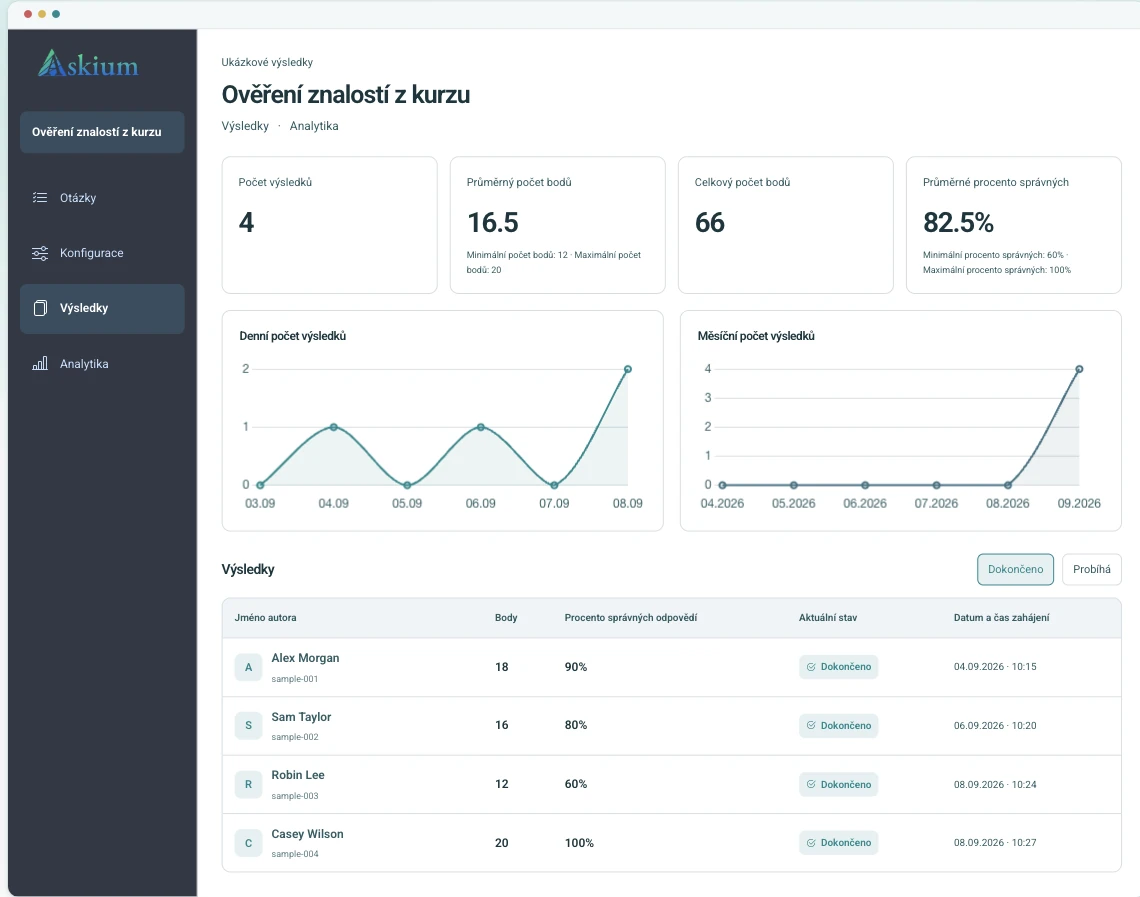
Sbírejte zpětnou vazbu a zjistěte, co je pro vaše publikum důležité.
Zhlédnout demoOvěřujte znalosti s automatickým bodováním a podrobnými výsledky.
Zhlédnout demoHodnoťte znalosti s osobními pozvánkami, časovými limity a sledováním.
Zhlédnout demoOd náboru po školení: sbírejte zpětnou vazbu, ověřujte znalosti a sledujte výsledky na jednom místě.
Pomocí časovaných kvízů, pozvánkových odkazů, bodování a analytiky porovnávejte odpovědi bez ručního čištění tabulek.
Porovnat limity PlusSpouštějte testy z výukové platformy a odesílejte známky zpět přes integraci LTI.
Přečíst dokumentaci integracíKombinujte osobní lístky, časovače otázek, monitorování akcí, signály proctoringu přes webkameru, klíče pro ověření výsledků a exporty.
Otevřít demo s proctoringemPublikujte značkové průzkumy, kontrolujte odpovědi a pomocí webhooků odešlete každý záznam do CRM nebo interního systému.
Vytvořit průzkumStejný proces podporuje jednoduché průzkumy i přísnější zkoušky, takže týmy nepotřebují samostatné nástroje pro tvorbu, distribuci a vykazování.
Přidejte otázky ručně, importujte je nebo pomocí AI vytvořte návrhy; nastavte bodování, časovače, stránky a branding.
Publikujte veřejný odkaz, vytvořte osobní pozvánkové odkazy nebo formulář spusťte přes integraci s LMS.
Účastníci odpovídají v klientském rozhraní s průběhem, časovači, pravidly přístupu, monitorováním a případně proctoringem.
Kontrolujte výsledky, exportujte reporty PDF/XLSX, ověřujte klíče výsledků a odesílejte data přes API, webhooky nebo vracení známek LTI.
Tvořte rychleji, upravte vzhled a porozumějte každé odpovědi.
Vygenerujte návrhy otázek a možností odpovědí z tématu a před publikováním je zkontrolujte a upravte.
Prohlížejte časy, přepínání karet a signály z webkamery společně s výsledkem zkoušky.
Zobrazte body, procenta správných odpovědí a analytiku jednotlivých otázek a exportujte výsledky či analytické reporty jako PDF/XLSX.
Použijte loga, barvy, styly tlačítek, typografii, pozadí a vzhled stránky výsledků v rozhraní účastníků.
Pro propojené hodnoticí procesy použijte API tokeny, webhooky, spuštění a deep linking LTI a vracení známek.
Pracovní skupiny umožňují kolegům spolupracovat na formulářích, odkazech, výsledcích, analytice, webhookách a brandingu s přesně vymezenými oprávněními.
Ano, máme bezplatný tarif se základními možnostmi pro tvorbu formulářů a testů.
Kromě toho mají placené tarify bezplatné zkušební období.
Časovač pro omezení času, míchání otázek a sledování přepínání karet/oken výrazně ztěžují opisování.
Je třeba chápat, že absolutní ochrana proti opisování neexistuje,
ale pokud má uživatel 30–40 otázek a na 1 otázku asi 60 sekund
a nesmí přepínat okna — v takovém případě, pokud nezná správnou odpověď, s největší pravděpodobností se splete.
Rozhraní i formuláře jsou dostupné v několika jazycích, včetně angličtiny, španělštiny,
němčiny, francouzštiny, ruštiny, ukrajinštiny, polštiny,
italštiny, chorvatštiny, češtiny a portugalštiny.
Tento seznam se bude časem rozšiřovat.
V bezplatném tarifu existují limity na počet aktivních formulářů a otázek. V placených tarifech jsou limity výrazně vyšší nebo chybí.
Ano, můžete nastavit celkový čas na absolvování testu nebo limit pro každou jednotlivou otázku.
Na základě zvoleného tématu nebo popisu služba automaticky vytváří testové otázky a možnosti odpovědí v jazyce, který je uveden v konfiguraci aktuálního formuláře.
Ano, přístup se nastavuje v konfiguraci: Veřejná je dostupná všem bez výjimky, a Na pozvánku je dostupná pouze přes speciální odkaz, který je potřeba vytvořit pro každého uživatele osobně. Kromě toho můžete formulář úplně stáhnout z přístupu zrušením jeho publikace.
Ano, všechny formuláře se automaticky přizpůsobují mobilním telefonům i tabletům.
Ano, v placených tarifech je dostupné kompletní přizpůsobení designu: logo, barevná paleta, pozadí a styly písem.
Ano, můžete zdarma otestovat plnou funkcionalitu po omezenou dobu před zaplacením.
Začněte v malém se skutečným formulářem nebo si před vytvořením účtu otevřete demo a prohlédněte si prostředí účastníka.