Umfragen
Sammeln Sie Feedback und erfahren Sie, was Ihrer Zielgruppe wichtig ist.
Live-Demo öffnenErstellen Sie Umfragen, Quizze und Prüfungen. Teilen Sie sie mit Ihrer Zielgruppe und gewinnen Sie Erkenntnisse aus jeder Antwort.
Starten Sie kostenlos. Erweitern Sie bei Bedarf.
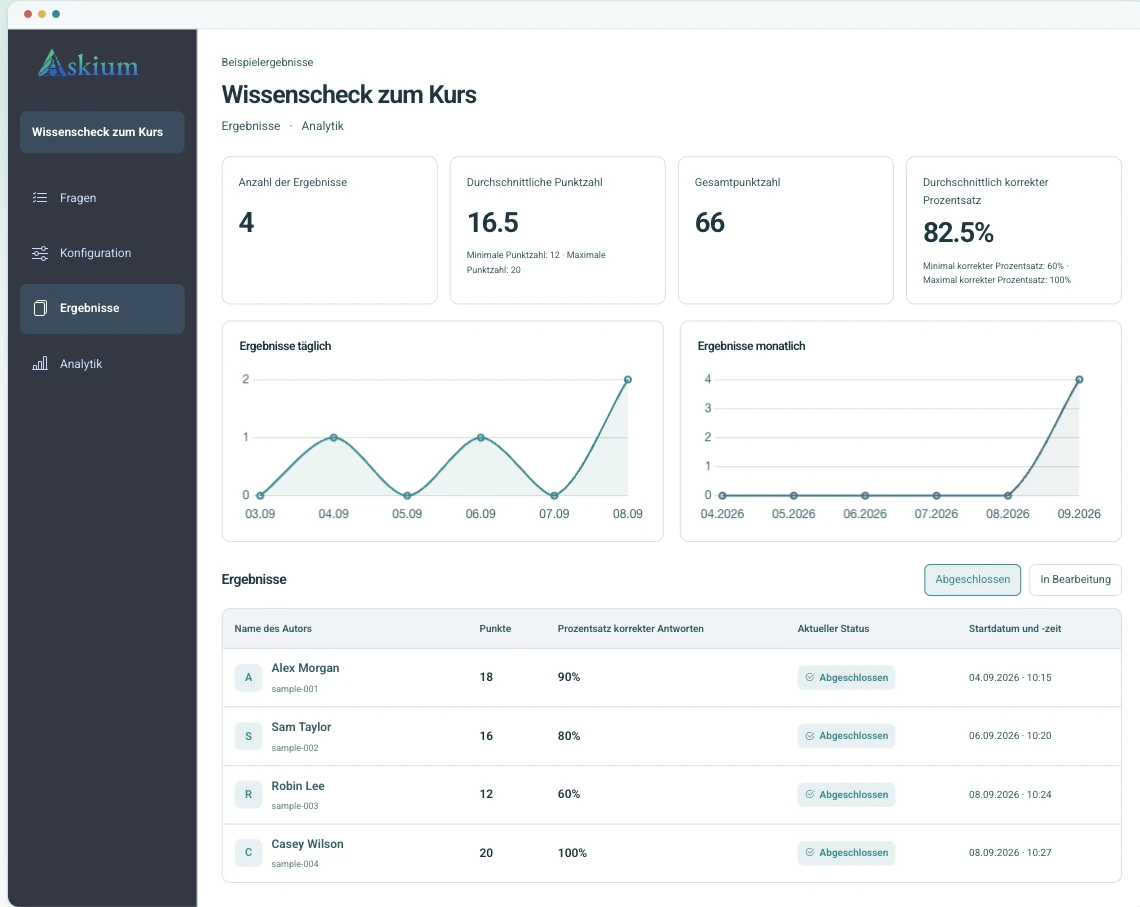
Vorschau der Desktop-Version mit Beispieldaten.
Sammeln Sie Feedback und erfahren Sie, was Ihrer Zielgruppe wichtig ist.
Live-Demo öffnenPrüfen Sie Wissen mit automatischer Bewertung und detaillierten Ergebnissen.
Live-Demo öffnenBewerten Sie Wissen mit persönlichen Einladungen, Zeitlimits und Überwachung.
Live-Demo öffnenVon der Personalauswahl bis zur Schulung: Feedback sammeln, Wissen prüfen und Ergebnisse an einem Ort sehen.
Nutzen Sie zeitlich begrenzte Quizze, Einladungslinks, Bewertungen und Analysen, um Antworten ohne nachträgliche Tabellenarbeit zu vergleichen.
Plus-Limits vergleichenStarten Sie Tests aus Ihrer Lernplattform und übertragen Sie Noten über die LTI-Integration zurück.
Integrationsdokumentation lesenKombinieren Sie persönliche Tickets, Fragentimer, Aktionsüberwachung, Webcam-Proctoring-Signale, Schlüssel zur Ergebnisverifizierung und Exporte.
Demo mit Proctoring öffnenVeröffentlichen Sie markengerechte Umfragen, prüfen Sie Antworten und senden Sie jede Einreichung per Webhook an Ihr CRM oder internes System.
Umfrage erstellenDerselbe Ablauf unterstützt einfache Umfragen und strengere Prüfungen, sodass Teams keine getrennten Werkzeuge für Erstellung, Durchführung und Berichterstattung benötigen.
Fügen Sie Fragen manuell hinzu, importieren Sie sie oder erstellen Sie Entwürfe mit KI; konfigurieren Sie Bewertung, Timer, Seiten und Branding.
Veröffentlichen Sie einen öffentlichen Link, erstellen Sie persönliche Einladungslinks oder starten Sie über eine LMS-Integration.
Teilnehmende antworten im Client-Ablauf mit Fortschrittsanzeige, Timern, Zugriffsregeln, Überwachung und optionalem Proctoring.
Prüfen Sie Ergebnisse, exportieren Sie PDF-/XLSX-Berichte, verifizieren Sie Ergebnisschlüssel und senden Sie Daten per API, Webhooks oder LTI-Notenrückgabe.
Schneller erstellen, individuell gestalten und jede Antwort verstehen.
Erstellen Sie anhand eines Themas Entwürfe für Fragen und Antwortoptionen, prüfen und bearbeiten Sie diese vor der Veröffentlichung.
Prüfen Sie Bearbeitungszeiten, Tabwechsel und Webcam-Signale zusammen mit dem Prüfungsergebnis.
Zeigen Sie Bewertungen, den Anteil richtiger Antworten und Analysen pro Frage an und exportieren Sie Ergebnis- oder Analyseberichte als PDF/XLSX.
Wenden Sie Logos, Farben, Schaltflächenstile, Typografie, Hintergründe und die Gestaltung der Ergebnisseite auf Teilnehmerabläufe an.
Nutzen Sie API-Tokens, Webhooks, LTI-Start- und Deep-Link-Abläufe sowie Notenrückgaben für verbundene Bewertungsabläufe.
Arbeitsgruppen ermöglichen Kolleginnen und Kollegen die Zusammenarbeit an Formularen, Links, Ergebnissen, Analysen, Webhooks und Branding mit abgestuften Berechtigungen.
Ja. Die Demoseite öffnet echte veröffentlichte Formulare: eine Umfrage, ein bewertetes Quiz und einen Prüfungsablauf mit Proctoring.
Umfragen sammeln Antworten ohne Bewertung. Quizze ergänzen richtige Antworten und Punkte. Prüfungen bieten zusätzlich ticketbasierte Durchführung und strengere Kontrollen wie Timer, Überwachung und Proctoring.
Kein System kann das garantieren. Askium zeichnet Webcam- und Browserereignisse auf, damit Prüfende riskante Versuche beurteilen und eine Entscheidung treffen können.
Ja. Das Produkt umfasst LTI-1.1-/1.3-Abläufe, API-Zugriff, Webhooks, öffentliche OpenAPI-/Postman-Ressourcen und Endpunkte zur Ergebnisverifizierung.
Ja. Askium unterstützt Ergebnis- und Analyseexporte, einschließlich der in der Anwendung verwendeten PDF- und XLSX-Abläufe.
Nutzen Sie Basic für einfache Umfragen. Plus eignet sich für KI-gestützte Quizze, Branding, API, Webhooks und eine Arbeitsgruppe. Pro ist für kontrollierte Prüfungen, LTI, Proctoring und höhere Limits vorgesehen.
Nein. Befragte, Quizteilnehmende und Prüfungskandidaten öffnen den öffentlichen Link, einen Einladungslink oder den LMS-Startablauf. Konten sind nur für Formulareigentümer und Teammitglieder erforderlich.
Ja. Nutzen Sie öffentliche Links für eine offene Teilnahme oder persönliche Einladungslinks für eine kontrollierte Durchführung. Prüfungsabläufe können Tickets, Timer, Überwachung und Zugriffsregeln ergänzen.
Ja. Veröffentlichte Formulare sind für Smartphones, Tablets und Desktop-Browser ausgelegt, sodass Teilnehmende keine separate App installieren müssen.
Eingereichte Antworten werden für Ergebnisse, Analysen, Exporte, Verifizierung und konfigurierte Integrationen gespeichert. Formulareigentümer können Formulare und Antworten in der Anwendung prüfen, exportieren und löschen.
Beginnen Sie mit einem echten Formular oder öffnen Sie die Demo, um die Teilnehmererfahrung vor der Kontoerstellung kennenzulernen.