Sondages
Recueillez des avis et découvrez ce qui compte pour votre public.
Ouvrir la démo en directCréez des sondages, des quiz et des examens. Partagez-les avec votre public et tirez des enseignements de chaque réponse.
Commencez gratuitement. Évoluez selon vos besoins.
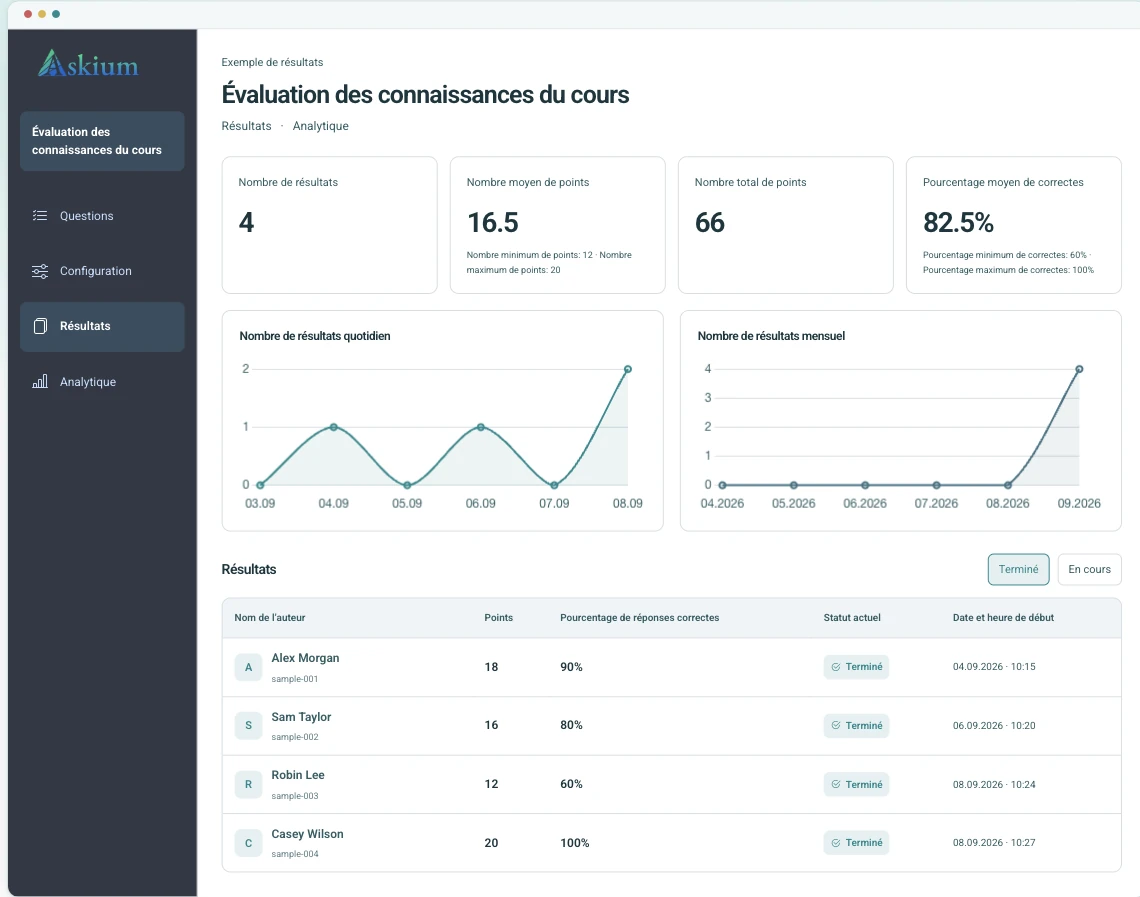
Aperçu de la version ordinateur avec des données de démonstration.
Recueillez des avis et découvrez ce qui compte pour votre public.
Ouvrir la démo en directVérifiez les connaissances avec une notation automatique et des résultats détaillés.
Ouvrir la démo en directÉvaluez les connaissances avec des invitations personnelles, des minuteries et un suivi.
Ouvrir la démo en directDu recrutement à la formation : recueillez des avis, évaluez les connaissances et consultez les résultats au même endroit.
Utilisez des quiz chronométrés, des liens d’invitation, la notation et les analyses pour comparer les réponses sans retraitement dans un tableur.
Comparer les limites de PlusLancez des évaluations depuis votre plateforme pédagogique et transmettez les notes grâce à l’intégration LTI.
Lire la documentation d’intégrationCombinez billets personnels, minuteurs par question, suivi des actions, signaux de surveillance par webcam, clés de vérification des résultats et exports.
Ouvrir la démo avec surveillancePubliez des sondages personnalisés, examinez les réponses et envoyez chaque soumission à votre CRM ou système interne via des webhooks.
Créer un sondageLe même flux prend en charge les sondages simples et les examens plus stricts ; les équipes n’ont donc pas besoin d’outils distincts pour la création, la diffusion et le reporting.
Ajoutez les questions manuellement, importez-les ou générez des brouillons avec l’IA ; configurez la notation, les minuteurs, les pages et la personnalisation.
Publiez un lien public, créez des liens d’invitation personnels ou lancez le formulaire via une intégration LMS.
Les participants répondent dans le flux client avec progression, minuteurs, règles d’accès, suivi et surveillance lorsqu’ils sont activés.
Examinez les résultats, exportez des rapports PDF/XLSX, vérifiez les clés de résultat et envoyez les données via l’API, les webhooks ou le retour de notes LTI.
Créez plus vite, personnalisez le style et comprenez chaque réponse.
Générez des brouillons de questions et d’options de réponse à partir d’un sujet, puis relisez-les et modifiez-les avant publication.
Consultez la durée, les changements d’onglet et les signaux de la webcam avec chaque résultat d’examen.
Consultez les scores, les pourcentages de bonnes réponses et les analyses par question, puis exportez les résultats ou rapports d’analyse en PDF/XLSX.
Appliquez logos, couleurs, styles de boutons, typographies, arrière-plans et styles de page de résultats aux flux des participants.
Utilisez les jetons API, les webhooks, les flux de lancement et de lien profond LTI ainsi que le retour des notes pour les évaluations connectées.
Les groupes de travail permettent aux collègues de collaborer sur les formulaires, liens, résultats, analyses, webhooks et éléments de marque avec des autorisations définies.
Oui. La page de démonstration ouvre de vrais formulaires publiés : un sondage, un quiz noté et un flux d’examen avec surveillance.
Les sondages recueillent les réponses sans notation. Les quiz ajoutent les bonnes réponses et la notation. Les examens ajoutent une diffusion par billets et des contrôles plus stricts, tels que minuteurs, suivi et surveillance.
Aucun système ne peut le garantir. Askium enregistre les signaux de webcam et les événements du navigateur afin que les examinateurs puissent analyser les tentatives à risque et prendre une décision.
Oui. Le produit comprend les flux LTI 1.1/1.3, l’accès API, les webhooks, des ressources publiques OpenAPI/Postman et des points de terminaison de vérification des résultats.
Oui. Askium prend en charge l’export des résultats et des analyses, notamment les flux PDF et XLSX utilisés par l’application.
Utilisez Basic pour les sondages simples. Plus convient aux quiz assistés par IA, à la personnalisation, à l’API, aux webhooks et à un groupe de travail. Pro est destiné aux examens contrôlés, à LTI, à la surveillance et aux limites supérieures.
Non. Les répondants, candidats aux quiz et participants aux examens ouvrent le lien public partagé, le lien d’invitation ou le flux de lancement LMS. Les comptes sont réservés aux propriétaires de formulaires et aux membres des équipes.
Oui. Utilisez des liens publics pour une collecte ouverte ou des liens d’invitation personnels pour une diffusion contrôlée. Les flux d’examen peuvent ajouter billets, minuteurs, suivi et règles d’accès.
Oui. Les formulaires publiés sont conçus pour les téléphones, tablettes et navigateurs de bureau afin que les participants puissent répondre sans installer d’application distincte.
Les réponses envoyées sont conservées pour les résultats, les analyses, les exports, la vérification et les intégrations configurées. Les propriétaires peuvent consulter, exporter et supprimer les formulaires et réponses depuis l’application.
Commencez modestement avec un vrai formulaire ou ouvrez la démo pour découvrir l’expérience participant avant de créer un compte.